
Parivahan Sewa Portal (Parivahan.gov.in): Online RC, Driving Licence, eChallan & RTO Services Explained (2026)
The Parivahan Sewa portal is the Government of India’s official online ecosystem for road transport services. In simple words, it’s where most RTO-related work has been moved online—so you can apply, pay fees, track status, and access important transport services without repeated visits to the RTO. The portal is run under the Ministry of Road Transport & Highways (MoRTH) and is designed, developed, and hosted by NIC (National Informatics Centre).
What people often call “Parivahan Sewa” is not just one page; it’s a set of connected official systems. The main idea is: pick the correct module (driving licence, vehicle services, challan), enter your details, and follow the guided steps shown for your state/RTO.
Note: Information in this guide is based on official Parivahan portal guidelines as of January 2026. Service availability and workflows may vary by state. Always verify current details on the official portals ending in .gov.in.
Official Parivahan Modules
Here’s the most useful way to understand the portal:
| Service Type | Module | What It Does | Official Link |
|---|---|---|---|
| Driving Licence / Learner Licence | Sarathi | LL/DL application, status check, renewal, duplicate, address change | sarathi.parivahan.gov.in |
| Vehicle/RC Services | VAHAN | Vehicle registration, RC transfer, road tax, fitness, hypothecation | vahan.parivahan.gov.in |
| Traffic Challan | eChallan / ITMS | View and pay traffic challans online | echallan.parivahan.gov.in |
| Digital DL/RC | mParivahan / DigiLocker | Legally valid digital copies of DL and RC | mParivahan App |
A quick reality check: not every service is identical in every state. The portal is national, but the exact options and workflows depend on state configuration and RTO rules.
What You Can Do on Parivahan
On the official Parivahan ecosystem, citizens commonly use online services for:
Driving Licence Services (Sarathi): Apply for Learner Licence (LL) and Permanent DL, book test appointments, check application status, renew expired DL, get duplicate licence, change address, apply for International Driving Permit (IDP), and update mobile number.
Vehicle Services (VAHAN): New vehicle registration, transfer of ownership (Form 29/30), hypothecation addition/termination, duplicate RC, change of address in RC, pay road tax, book fitness test, and get NOC for inter-state transfer.
eChallan: Check challan details by vehicle number or DL number, pay traffic fines online, and download payment receipts.
Forms & Downloads: Download commonly required licence and vehicle forms (Form 1, 1A, 2, 4, 9, 20, 29, 30, etc.) from the official directory.
This is the main benefit of Parivahan: instead of guessing which form you need (or trusting random “agent lists”), you can pull the standard forms from the official directory and follow the portal’s guided process.
Key Features of the Parivahan Sewa Portal
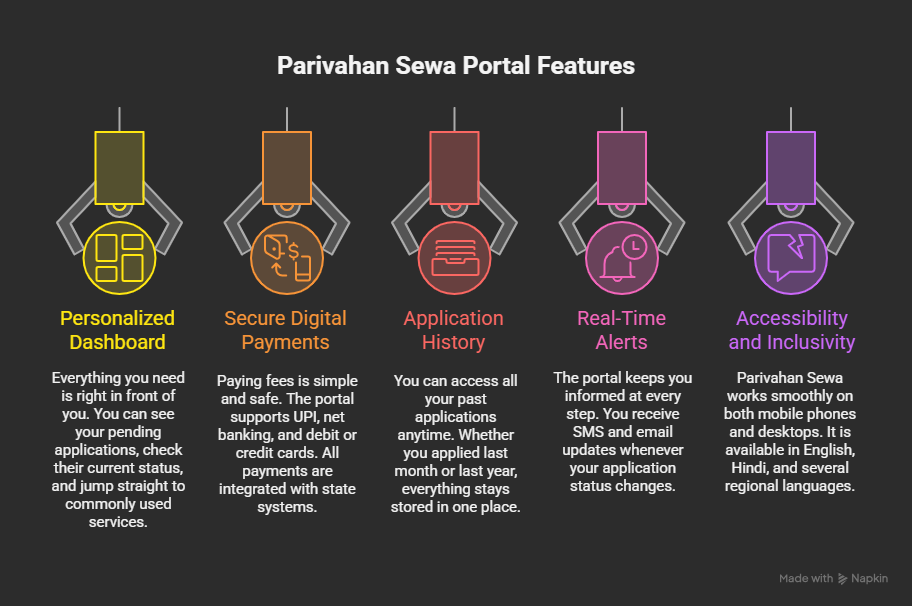
The Parivahan portal offers several features that make transport services more accessible:
Centralised Database: Connects RTOs across all states and Union Territories, providing a unified system for vehicle registration and driving licence information.
Online Application & Payment: Apply for services, upload documents, and pay fees online using UPI, debit/credit cards, or net banking—no need for cash transactions at RTO counters.
Real-Time Status Tracking: Track your application progress at every stage, from submission to approval to dispatch.
Digital Document Storage: Integration with mParivahan app and DigiLocker enables legally valid digital copies of DL and RC that you can show during traffic checks.
Appointment Booking: Schedule test slots and RTO visits online, reducing wait times and avoiding long queues.
How the Parivahan Sewa Portal Works
The general workflow for most Parivahan services follows these steps:
Step 1: Visit the appropriate portal (Sarathi for licence, VAHAN for vehicle) and select your state.
Step 2: Register or log in using your mobile number or email ID. An OTP will be sent for verification.
Step 3: Choose the service you need (new application, renewal, duplicate, etc.).
Step 4: Fill the online application form with required details.
Step 5: Upload scanned documents in the specified format (usually JPG/JPEG, under 200KB).
Step 6: Complete online payment using UPI, debit/credit card, or net banking.
Step 7: Book an appointment slot (if RTO visit is required for verification or test).
Step 8: Track your application status until completion.
How to Check Your Application Status
If you applied for a driving licence-related service and want to see progress, Parivahan’s official FAQ gives these steps:
For Driving Licence/LL Status (Sarathi)
Visit Sarathi state selection page, select your state, and choose “Application Status” from the “Apply Online” menu. Enter your application number and date of birth to view your current stage.
For Vehicle/RC Status (VAHAN)
Visit VAHAN e-Services, log in with your registered account, and navigate to “Application Status” to check pending vehicle-related applications.
This typically shows which stage your application is in (submitted, pending at RTO, approved, dispatched, etc.). If you’re stuck at one stage for a long time, it usually means document verification is pending, or the RTO needs an in-person step as per the acknowledgement instructions.
Updating Your Mobile Number
A very practical thing the official systems now push is keeping your mobile number updated, because OTPs and alerts depend on it. Sarathi’s own homepage displays a message advising DL holders and vehicle owners to update mobile numbers in Sarathi and VAHAN.
Update Mobile Number for Driving Licence (Sarathi)
Parivahan’s FAQ says: Visit Sarathi, select your state, and use “Mobile Number Update” from the “Others” menu. You’ll need your DL number and date of birth to proceed.
Update Mobile Number for Vehicle/RC (VAHAN)
Parivahan’s VAHAN FAQ lists this flow: Visit VAHAN, register/login if needed, go to Other Services → Update User Mobile No, enter registration number + last 5 digits of chassis/engine number + previous mobile, generate OTP, then update.
Downloading Forms (Form 1, Form 2, etc.)
When applying for licence/vehicle services, specific form numbers will usually be required. Parivahan has created an official “Download Forms” page listing common driving licence and vehicle registration forms.
Common Licence Forms: Form 1 (self-declaration of fitness), Form 1A (medical certificate), Form 2 (LL/DL application), Form 4 (DL application), Form 9 (renewal).
Common Vehicle Forms: Form 20 (new registration), Form 29 (notice of transfer), Form 30 (intimation of transfer), Form 35 (hypothecation termination).
Digital DL/RC: Is mParivahan or DigiLocker Accepted?
Yes. MoRTH issued an official circular (No. RT-11036/64/2017-MVL dated August 8, 2018) stating that DL and RC available on DigiLocker or the mParivahan app are legally valid electronic records under the Information Technology Act, 2000, and should be treated at par with original documents.
That same circular also explains two practical points people often miss:
Insurance verification: If insurance details are visible in the ministry’s systems/apps (mParivahan/VAHAN), insisting on a physical insurance copy should not be enforced.
Electronic impounding: If documents need to be “impounded” due to an offence, it can be reflected electronically through the eChallan system, so physical seizure may not be required in many cases.
Troubleshooting: Common Glitches and Fixes
The Parivahan portal handles millions of requests, so glitches happen. Here is how to handle the frustrating moments.
Payment Successful but Status Shows “Pending”
This is the most common issue. You pay the fee, money leaves your bank, but the website says “Pending” or “Failed.” Do not pay again immediately! Wait 30 minutes to 24 hours. Go to the “Check Payment Status” or “Verify Pay” option on the service page. Click “Re-verify” to force the Parivahan server to ping your bank server and update the status. If still unresolved after 48 hours, contact the helpdesk with your transaction ID and bank reference.
No Appointment Slots Available
If you can’t find a slot for your driving test, don’t assume the website is broken. RTOs release slots at specific times (often 10:00 AM or 11:00 AM). These slots get booked within minutes. You need to be logged in and ready exactly when the booking window opens. Try checking on different days or look for slots at nearby RTOs.
“Record Not Found” or “Details Not Matching” Error
When searching for your details, if you get this error, it’s usually a data entry mismatch from years ago. Check your physical document carefully. If your name is “V. Kumar” on the paper DL, searching for “Vijay Kumar” will fail. You must enter it exactly as it was printed, including spaces and abbreviations.
Document Upload Fails
Ensure files meet size and format limits (usually JPG/JPEG format, under 200KB). Rename files using only English characters without spaces or special characters. Scanned documents typically work better than phone photos. If uploads keep failing, try a different browser or clear your cache.
OTP Not Received
Check if your mobile number is correctly registered. Ensure you haven’t blocked transactional SMS. Wait a few minutes before requesting a resend. If the problem continues, try from a different device or contact your service provider to check if DND is blocking government SMS.
Official Helpdesk Contacts
If you face technical issues, Parivahan lists official helpdesk contacts by service area:
- Vehicle Services (VAHAN): helpdesk-vahan@gov.in | Phone: 0120-4925505 (6 AM – 10 PM)
- Licence Services (Sarathi): helpdesk-sarathi@gov.in | Phone: 0120-2459169
- mParivahan App: helpdesk-mparivahan@gov.in | Phone: 0120-2459171
- eChallan: helpdesk-echallan@gov.in | Phone: 0120-4925505
When contacting support, include: your state + RTO name, application/registration number, date of birth, transaction reference (if payment related), and a screenshot of the error.
Frequently Asked Questions
Conclusion
The Parivahan Sewa portal is a massive leap forward for Indian governance. While it has a learning curve, understanding the distinction between Sarathi (for your licence) and VAHAN (for your vehicle) solves half the puzzle.
By utilizing the online services and the mParivahan app, you can save countless hours that would otherwise be spent in queues at government offices. Just remember: when in doubt, check the status online before visiting the RTO, and always use official .gov.in domains to avoid scams.